Barbershop
MK Barbers Level Up
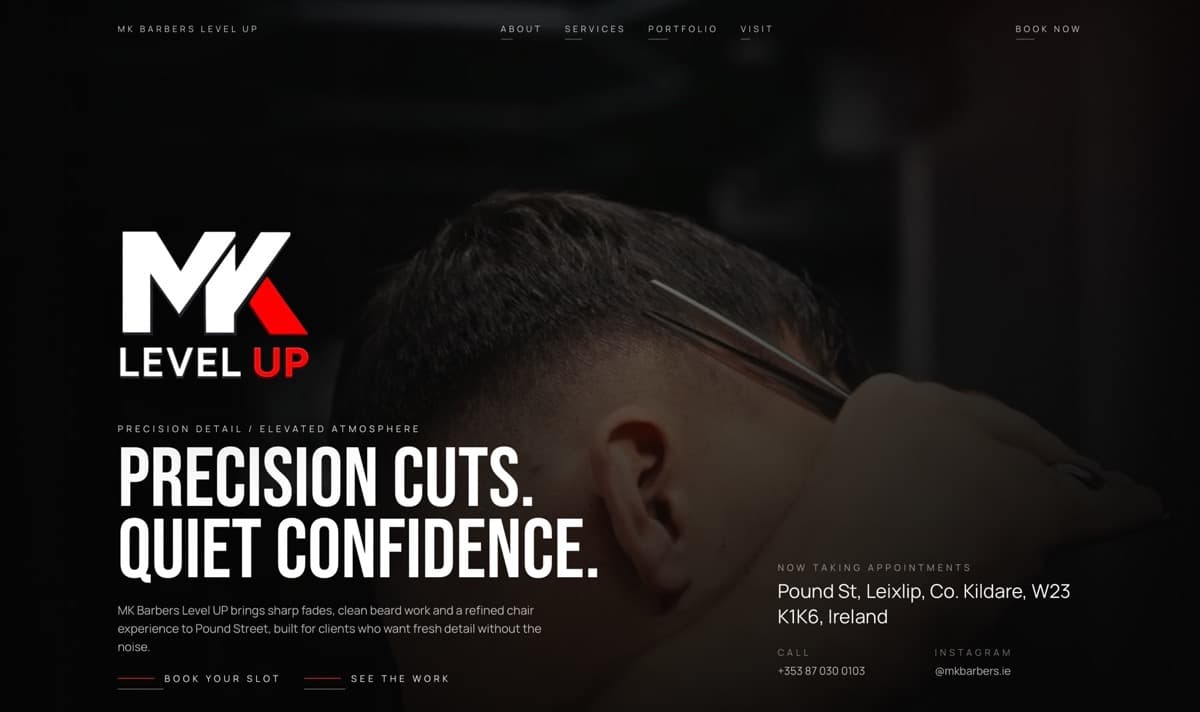
Dark colors, narrow fonts, and haircut photos give the barbershop its look. Visitors can browse the work, check services and prices, and find hours and directions for a visit.
Your ad makes a promise. Your landing page should explain the offer, answer questions, and make it easy to inquire, book, or buy. MalixCode plans, writes, designs, and builds the page around your campaign.
From $1,800Final price depends on what’s included
We reply within 6–12 hours using your preferred contact method.
Your website project
From a landing page for one offer to a larger website. We agree on the pages, features, and price before work starts.
Website text, design, and development · Pages and features agreed on before we start
Selected work
MK Barbers Level Up and Carolina Massage are client websites. They show clear service descriptions, practical visit details, and easy ways to contact or book. These examples do not include ad campaign performance results.
Barbershop
Dark colors, narrow fonts, and haircut photos give the barbershop its look. Visitors can browse the work, check services and prices, and find hours and directions for a visit.

Massage practice
Warm photos and a personal introduction help clients get to know Carolina and explore her treatments. Clients book appointments through MassageBook, the practice’s chosen provider.
Who it’s for
A landing page works well for a new service, promotion, product launch, or consultation offer. Each section explains the offer and guides visitors toward one main action.
How your website can help
The visitor should recognize the offer, find answers, and know what they’re signing up for.
Use a headline and opening section that match the ad, so visitors immediately recognize the service or product they came to see.
Focus the page on one offer and one main action, with the details people need before they decide.
Keep useful campaign information with the inquiry so you can trace its source without sharing personal form details with analytics tools.
How we build it
Start with the offer from your ad. Add relevant examples, prices or terms where appropriate, and answers to common questions. Include a form, booking link, or checkout. The design can match your current website and use the same domain.
Features to consider
Choose what the page needs to explain the offer and record the inquiries it receives.
How we work
At each stage, you know what you’ll receive and when to give feedback before we move on.
We turn our first conversation into a written project plan covering your audience, goals, pages, content, connections to other tools, and launch requirements.
We map out the pages, create simple layout sketches for the main screens, and write the text for each page.
We design the main pages for your approval, then build a website that works on phones, tablets, and computers, with the features and connections in your project plan.
We test the website in the agreed browsers and screen sizes. We fix issues covered by the project agreement before launch and turn over the agreed materials to you.
Basic and Pro include up to 2 revision rounds each for page structure and design; Advanced includes up to 3 rounds for each stage. One decision-maker sends a single feedback list for each round. If you request changes to an approved stage, we review how they affect the project agreement before continuing.
You receive the live website, its code and version history, agreed files, relevant account access, and instructions for running the site, as listed in your project proposal. Accounts and licenses from other providers remain subject to their terms.
Technical fixes covered by the project agreement are included for 1 month after launch with Basic and Pro, and 2 months with Advanced. New pages, content, features, ongoing maintenance, and changes to third-party services are planned and priced separately.
FAQ
A separate page helps when the offer or audience is different enough to need its own message. Closely related searches can share a page that meets the same customer need.
Yes. The page can use your domain, match your website’s design, and share its privacy controls and inquiry process while focusing on your campaign.
Yes, when it has useful content that is different from your other pages. We choose search engine settings for the page, including whether it can appear in search results.
The page can attach campaign source details to each inquiry, including the first and most recent recorded sources. You can see which campaign brought the visitor to the page.
We count an inquiry after the form is successfully submitted. We also check that analytics and ad tools do not count the same submission more than once.
A landing page for one offer starts at $1,800. Your final quote depends on the pages, features, and connections to other tools that we agree on; larger projects can cost $3,200 or more. Pay 50% before work begins and 50% when the website is ready. Technical fixes covered by the project agreement are included for 1 month with Basic and Pro, and 2 months with Advanced. Domain registration, hosting, and paid services cost extra.
View pricingYour next website
From $1,800. The final price depends on what your project includes. Pay 50% to start and 50% when the website is ready. We reply within 6–12 hours. Share the campaign, who it’s for, and what someone needs to know before they respond.