The experience starts before the appointment

Before booking, a new client wants to know who you are, which session to choose, and what a visit involves. MalixCode creates massage and wellness websites that answer those questions in the voice of your practice.

Start a project

Roman replies within 6–12 hours using your preferred contact method.

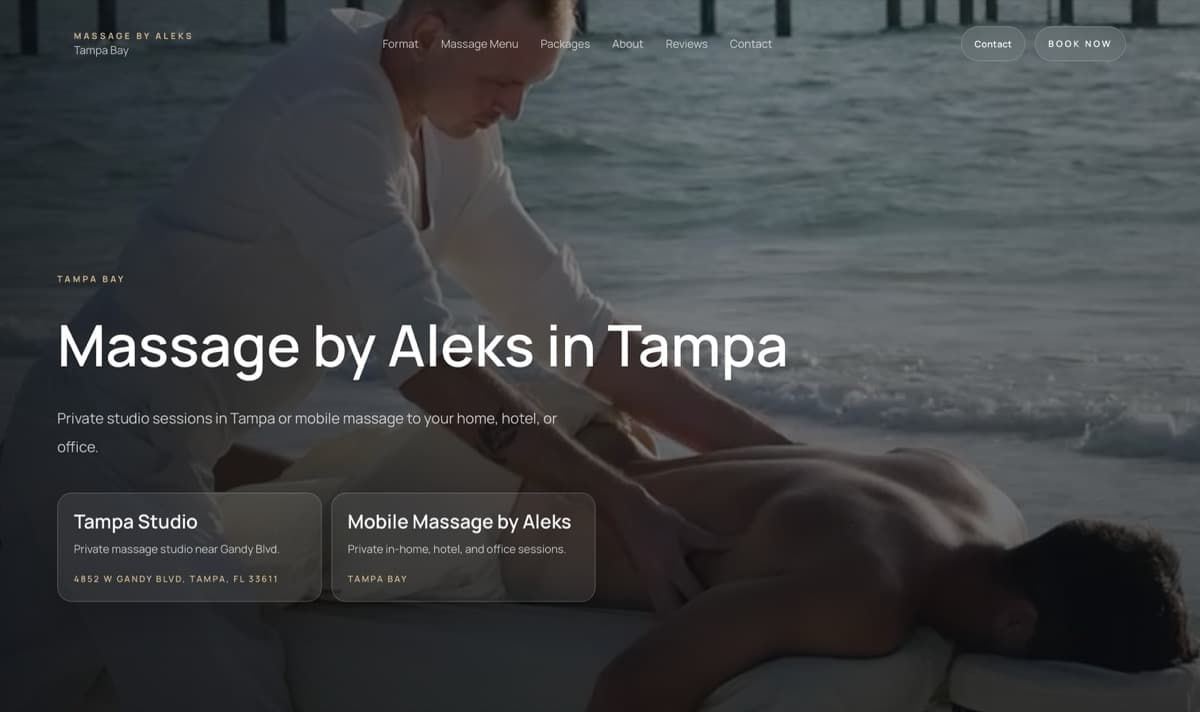
Massage by Aleks website preview

Who it’s for

For independent practitioners and growing wellness businesses

Private studios, mobile massage providers, and wellness practices need to balance a personal welcome with practical information. The website can explain different treatments and locations while giving clients a sense of the people behind the service.

The opportunity

Help clients feel ready to book

A service name rarely answers every question. Explain the session, the setting, and the booking details before asking someone to choose.

Explain what makes each session different

Give treatments a clear description, duration, price, and practical expectations so clients can compare their options.

Make the location choice obvious

Distinguish studio visits from appointments at home, a hotel, or an office, with the details each option requires.

Keep the chosen service in view

Place booking links beside the relevant treatment or package, with a contact option for clients who have a question first.

Bring the character of your practice online

Share your services, where you work, and the questions clients ask before their first appointment.

Start a project

The approach

A personal introduction and a practical way to book

Introduce yourself and your approach, then give each treatment its description, duration, and price. Studio and mobile options can have separate booking details. The site can connect to your current booking provider or use a request form suited to your practice.

What’s possible

The practical side of a personal service

Plan the service information, language options, and booking features your clients need.

  • Treatment descriptions, durations, prices, and add-ons
  • Separate studio, mobile, and location options
  • Links to your booking provider or custom appointment requests
  • Session packages and checkout where your payment setup supports it
  • Client reviews and videos you have permission to publish
  • A consistent experience in two languages when needed
  • Mobile page performance, local search setup, and campaign source tracking

Selected work

Three practices, with different needs

Carolina Massage connects a personal website to MassageBook. Massage by Aleks separates studio and mobile sessions. Golden Bamboo pairs a new identity with 16 treatments in Ukrainian and English.

Massage by Aleks website preview

Studio and mobile massage

Massage by Aleks

Studio appointments and mobile sessions share one site. Visitors choose where the appointment happens, then explore treatments, packages, and booking.

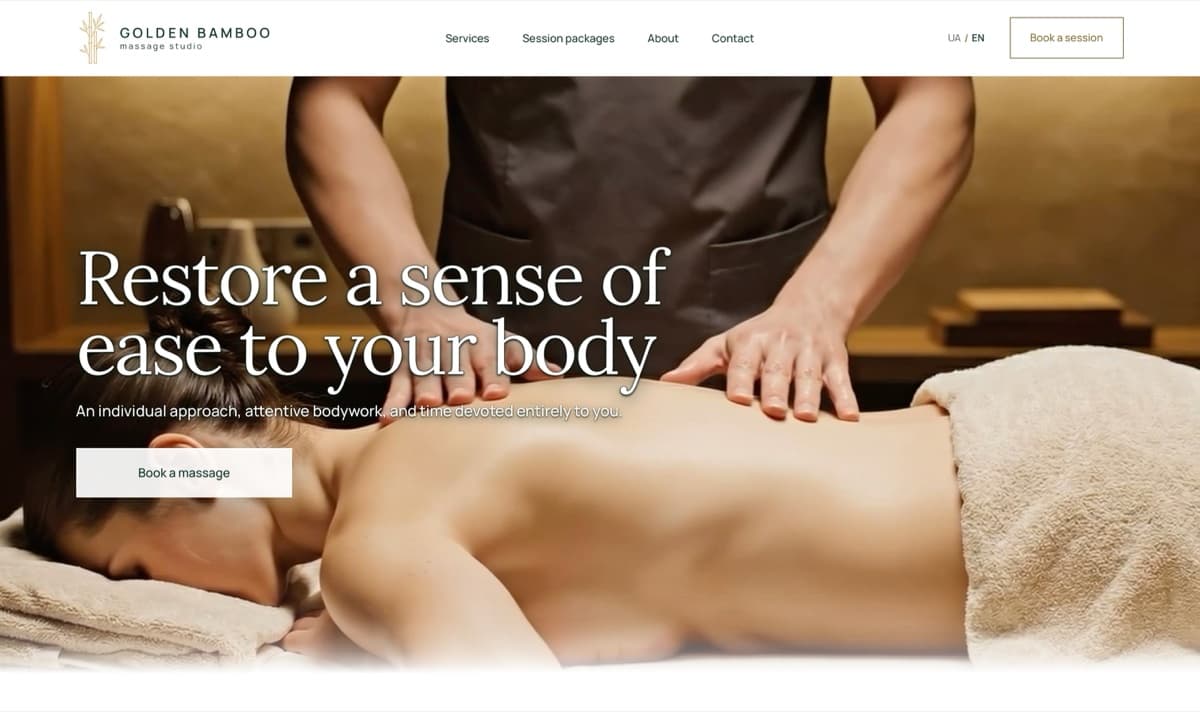
Golden Bamboo massage studio website preview

Massage studio

Golden Bamboo

A bamboo-inspired identity, original photography, and a Ukrainian–English website for 16 treatments. Booking carries the chosen service and language into the form.

Carolina Massage website with warm tones and full-width massage photography

Massage practice

Carolina Massage

Warm photography and a personal introduction lead into Carolina’s treatment menu. Appointment scheduling stays with MassageBook, the practice’s chosen provider.

Puzzle Construction website preview

Construction and remodeling

Puzzle Construction

Seven service categories give homeowners a place to start, from a repair to a renovation. Relevant project photos sit alongside service details and estimate requests.

MK Barbers Level Up website preview

Barbershop

MK Barbers Level Up

A dark palette, condensed type, and haircut photography bring the barbershop online. Services, prices, hours, and directions help turn a look at the work into a plan to visit.

Dominant Series website preview

Personalized books · E-commerce

Dominant Series

Print-inspired design introduces a made-to-order book. Printed, digital, and gift formats lead into the delivery, payment, and questionnaire steps each order needs.

View all work

How projects take shape

From the first conversation to launch

Each stage has a defined deliverable and a place for your feedback. You know what you’re reviewing before the project moves forward.

  1. Define the project

    The first conversation becomes a written brief: audience, goals, pages, content, integrations, and what needs to be in place for launch.

    You receive
    An agreed brief and milestone plan.
    Your part
    Business details, existing assets, website context, required access, and one person to approve the work.
  2. Plan the pages and content

    A sitemap sets out the pages. Wireframes establish the layout of key screens. The copy gives each page the information and emphasis it needs.

    You receive
    An approved sitemap, wireframes, and content direction.
    Your part
    Consolidated feedback on priorities, accuracy, and missing content.
  3. Design and build

    Key-page designs establish the look of the site. Once approved, they become a responsive build with the functionality and integrations in your brief.

    You receive
    Approved key-page designs and a working responsive website.
    Your part
    Consolidated milestone feedback, final content, and the access needed for development.
  4. Test, launch, and hand off

    The build is checked across the agreed browsers and screen sizes. In-scope defects are resolved before release and the agreed handoff.

    You receive
    A launch-ready website, source repository, agreed assets and access, and operating notes.
    Your part
    Final approval and access to the domain, hosting, and third-party services needed for launch.

Clear expectations at every stage

Up to two rounds of revisions

Structure and visual direction each include up to two consolidated revision rounds. One decision-maker provides a single feedback list per round. Changes to an approved milestone are reviewed as a change in scope before work continues.

An agreed handoff

The live website, source repository, agreed assets, relevant account access, and operating notes are handed over as set out in the project proposal. Third-party accounts and licenses remain subject to their providers’ terms.

Support after launch

Technical defects within the approved scope are covered during the support period stated in the project proposal. New pages, content, features, and changes to third-party services are scoped separately.

FAQ

Planning your practice’s website

Can the site separate studio and mobile appointments?

Yes. Each format can have its own description, location or service area, practical details, and booking process.

Can clients compare prices and packages?

Yes. Services, durations, prices, add-ons, and packages can be presented together. Checkout is an option when your business and payment provider support it.

Can you connect my current booking system?

Yes. The website can link to your existing provider or include a custom appointment request, depending on how your practice handles bookings.

Can the website be bilingual?

Yes. Both languages can have their own pages, search descriptions, and navigation, with a consistent experience from the homepage through booking.

Can I include reviews or client videos?

Yes. Reviews and videos can be included when you have permission to publish them and their source can be verified.

What does a website cost?

The three one-time packages are $1,800, $2,500, and $3,200. The right package and final scope are confirmed after a conversation about your project.

View pricing

Your next website

Make your website feel like your practice

Describe your approach, the sessions you offer, and how clients currently book. Those details will shape the project.

Do you already have a website?required
How would you like to be contacted?required

Choose one option and add your contact details below.

Your details are used to respond to your inquiry. Optional analytics requires a separate choice in your privacy settings.